Real time updates of trades
Logging your real time trades to PA pro
June 18 2026 update
Get PortfolioAnalyst1.42_RealTime.eld (or newer) Email if you don't have it
Install the strategy on your chart, and enter the system name in Sysname
IE "MygoldSystem1"
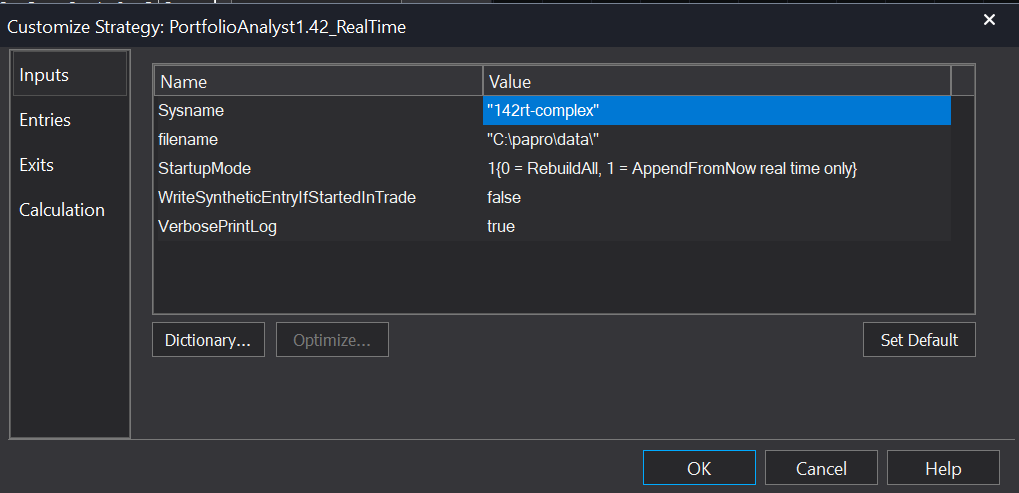
Startupmode
If set to zero you will get historical only trades
If set to 1, you will real time trades.
If you set it to zero, then close the inputs section in TS.
Let the chart produce data, then change the startup mode to one, you will get historical trades with real time trades appended.
WriteSyntheticEntryIfStartedInTrade
If you opened your chart for a stale trade (it entered a few bars ago) but you want to log the exit,
set this to true. It will use the TS hypothetical entry, and the real time exit.
What can go wrong
Lets say you are logging trades, shutdown TS as your on holiday, 1/2 trading day, or do control R and a trade changes.
You might then get the valid and stale buy, then a more recent buy. PA pro can not cope with this, just as if you logged your trades manually in excel - you would have an error.
Ultimately you the human, need to make a decision on this.
You could delete the .pa file and start again, edit the pa file - a bit complex to do, but still an option.
We may make a PA file edit function, but its being investigated how this would work