Command line options
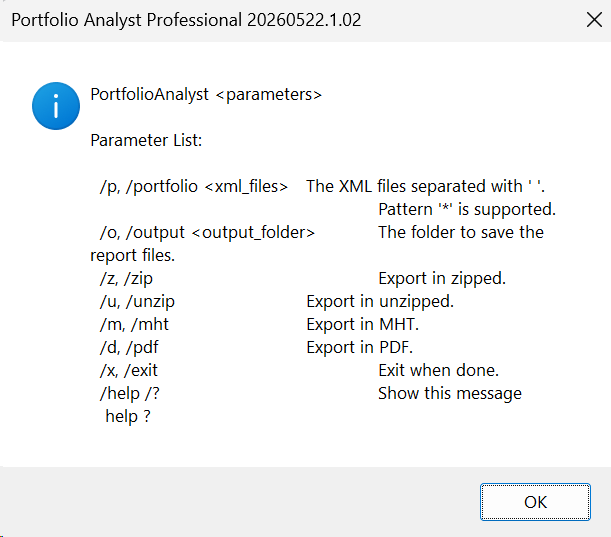
Load your system(s) in PAPro, save the xml name.
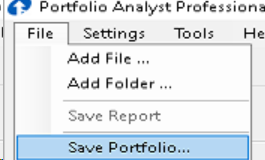
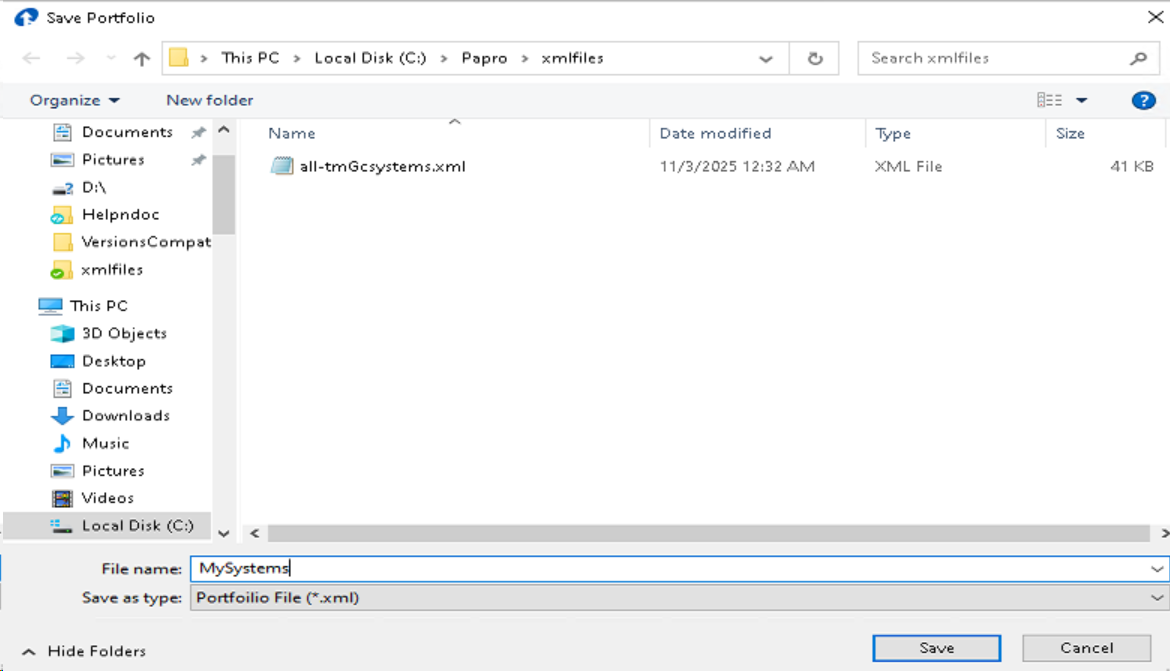
Run this batch command.
c:
cd \papro
PortfolioAnalyst /p MySysetms.xml /o c:\wamp64\www\gsbhelp\reports /exit
Output files will be in c:\wamp64\www\gsbhelp\reports
# PAPro Command-Line Options
## Overview
Portfolio Analyst (PAPro) supports command-line batch mode for automated report generation. When arguments are provided on the command line, `Program.Main(string[] args)` detects non-empty `args`, sets `Globals.AutoBatchMode = true`, and runs the full GUI pipeline without user interaction.
The application window is created (WinForms `Application.Run(new MainForm())`) even in batch mode. Reports are generated programmatically, and the window is closed only when `/x` or `/exit` is provided.
## Syntax
```
PortfolioAnalyst.exe /p <xml_files> /o <output_folder> [/z] [/u] [/m] [/d] [/x] [/help]
```
## Parameters
### `/p` or `/portfolio` — Portfolio XML files
| Property | Value |
|----------|-------|
| Required | Yes (unless `/help` is used) |
| Syntax | `/p <file1> <file2> ...` or `/portfolio <file1> <file2> ...` |
| Wildcard | Supports `*` wildcard in the filename portion (e.g. `/p P:\folder\*.xml`) |
| Paths | If a path does not contain `:\`, it is resolved relative to the `xmlfiles` folder next to the executable |
| Multiple | Space-separated list; stops at the first argument starting with `/` |
Each XML file is a **Portfolio XML** file (serialized `AppSettingsEx` format), NOT a raw system data file (`.pa` or `.xml` trade file). The portfolio XML contains:
- `AppSettings` (LoadedFiles, FileCheckedStatus, Weights, etc.)
- `FuturesList`, `ForexList`, `StockList` (fee dictionaries)
**Source:** `Program.cs`, lines 174–257 (`ParseArgs` method)
### `/o` or `/output` — Output folder
| Property | Value |
|----------|-------|
| Required | Yes (unless `/help` is used) |
| Syntax | `/o <folder>` or `/output <folder>` |
| Created | Created automatically if it does not exist |
**Source:** `Program.cs`, lines 258–283
### `/z` or `/zip` — Export as ZIP
| Property | Value |
|----------|-------|
| Required | No |
| Syntax | `/z` or `/zip` |
| Effect | Report is saved as a `.zip` file containing MHT/PDF output |
### `/u` or `/unzip` — Export as unzipped folder
| Property | Value |
|----------|-------|
| Required | No |
| Syntax | `/u` or `/unzip` |
| Effect | Report is saved as loose files (MHT/PDF) in the output folder |
**Note:** When neither `/z` nor `/u` is specified (`AutoBothZipUnzip = true`), **both** zipped and unzipped exports are generated.
**Source:** `Globals.cs`, line 25
### `/m` or `/mht` — Export MHT format
| Property | Value |
|----------|-------|
| Required | No |
| Syntax | `/m` or `/mht` |
| Effect | Generates MHT (web archive) report output |
### `/d` or `/pdf` — Export PDF format
| Property | Value |
|----------|-------|
| Required | No |
| Syntax | `/d` or `/pdf` |
| Effect | Generates PDF report output |
### `/x` or `/exit` — Exit when done
| Property | Value |
|----------|-------|
| Required | No |
| Syntax | `/x` or `/exit` |
| Effect | PAPro exits automatically after all reports are generated. Without this flag, the application window stays open. |
**Source:** `Program.cs`, lines 153–154
### `/help`, `help`, `/?`, `?` — Show help
| Property | Value |
|----------|-------|
| Required | No |
| Syntax | `/help`, `help`, `/?`, or `?` |
| Effect | Displays the help text in a message box and exits. All other parameters are ignored. |
**Source:** `Program.cs`, lines 148–151
## What the Batch Pipeline Does
1. **MainForm load** (`MainForm.cs` line 2639): Detects `Globals.AutoBatchMode`.
2. **Clears session** (`MainForm.cs` line 2650–2652): `tableDataFiles.Rows.Clear()`, `systemMarketList.Clear()`, `strategySettingsList.Clear()`.
3. **For each portfolio XML file** (`MainForm.cs` line 2660):
- Loads `AppSettingsEx` from the XML file
- **Filters to checked (enabled) files only** — unchecked files in `FileCheckedStatus` are skipped (`MainForm.cs` lines 2671–2713)
- Applies settings, fee dictionaries
- Calls `initialize(false)` to load and process the trade/price data
- If `LoadedFiles` count ≤ 3, automatically clicks Generate Report
- On report completion, ZIP/MHT/PDF output is saved to `AutoOutputFolder`
4. **After all XML files processed**: Checks `Globals.AutoExit` — if true, closes the application.
### File checked-status filtering detail
The batch mode **only processes checked (enabled) files**. For each portfolio XML:
- `LoadedFiles` and `FileCheckedStatus` arrays are read
- Unchecked entries are skipped (logged as `COMMAND_LINE_XML_SKIPPED_UNCHECKED`)
- Only checked entries are used for loading and report generation
**Source:** `MainForm.cs`, lines 2671–2713
## Logs
PAPro logs all batch activity using standard NLog to the Windows Event Log (if `APPNAME` env var is set). Key diagnostic log prefixes:
- `COMMAND_LINE_XML_BATCH_MODE_ENABLED`
- `COMMAND_LINE_XML_FILE`
- `COMMAND_LINE_XML_CLEARED_SESSION_SYSTEMS`
- `COMMAND_LINE_XML_PROCESSING_START`
- `COMMAND_LINE_XML_FILTER_CHECKED`
- `COMMAND_LINE_XML_SKIPPED_UNCHECKED`
- `COMMAND_LINE_XML_CHECKED_FILES`
- `COMMAND_LINE_XML_FILE_COUNT`
- `COMMAND_LINE_XML_LOADED_FILE`
## Source Locations
| Component | File | Lines |
|-----------|------|-------|
| Entry point + arg parsing | `Program.cs` | 22, 146–295 |
| Global flags | `Utils/Globals.cs` | 1–58 |
| Batch mode dispatch | `UI/Forms/MainForm.cs` | 2639–2760 |
| Report completion (batch) | `UI/Forms/MainForm.cs` | 3653, 3683–3701 |
| Report generation + export | `UI/Forms/MainForm.cs` | 3823–3833 |
| Auto-exit check | `UI/Forms/MainForm.cs` | 3878 |
## Known Examples
```batch
:: Basic: process one portfolio XML, save MHT report to output, unzipped, exit
PortfolioAnalyst.exe /p "P:\papro\xmlfiles\MyPortfolio.xml" /o "C:\Reports" /m /x
:: Process multiple XML files with wildcard
PortfolioAnalyst.exe /p "P:\papro\xmlfiles\*.xml" /o "C:\Reports" /m /d /x
:: Process one XML file, export both zipped and unzipped PDF and MHT, don't exit
PortfolioAnalyst.exe /p "C:\config\portfolio1.xml" /o "C:\Reports" /m /d
:: Process XML with relative path (resolved under xmlfiles folder)
PortfolioAnalyst.exe /p MyPortfolio.xml /o "C:\Reports" /z /x
:: Show help
PortfolioAnalyst.exe /help
```
## Unsupported / Commonly Assumed Switches
The following switches are **not supported**:
| Switch | Status | Notes |
|--------|--------|-------|
| Unnamed XML path argument | **Not supported** | `PortfolioAnalyst.exe "file.xml"` without `/p` is ignored (no args → GUI mode) |
| `/batch` | **Not supported** | Batch mode is auto-detected when any arguments are present |
| `/silent` | **Not supported** | The application window still appears in batch mode |
| `/run` | **Not supported** | Processing is automatic when `/p` and `/o` are provided |
| `/close` | **Not supported** | Use `/x` or `/exit` to close after completion |
| `--` prefix (double-dash) | **Not supported** | Only `/` prefix is supported |
| Single-system `.pa` or trade `.xml` as input | **Not supported** | Input must be portfolio XML (`AppSettingsEx` format) |
| Raw trade file processing | **Not supported** | CLI mode only processes portfolio XML, not raw `.pa`/trade `.xml` files |
## Troubleshooting
### XML path with spaces
Always quote paths containing spaces:
```batch
PortfolioAnalyst.exe /p "C:\My Reports\portfolio.xml" /o "C:\Output" /x
```
### Use absolute paths
Relative paths without `:\` are resolved relative to the `xmlfiles` folder next to `PortfolioAnalyst.exe`.
Always use absolute paths unless the XML file is intentionally under the `xmlfiles` folder.
### File checked-status controls processing
Only files with `FileCheckedStatus = true` in the portfolio XML are loaded and processed. Unchecked files are skipped. If all files are unchecked, nothing is processed.